Book an Appointment
Call Peoria Computer Repair Service at 623-295-2645
                   

(623) 295-2645

*


Peoria Computer Repair Service has been providing the best mobile computer repair in Peoria, AZ and the greater Phoenix Metro Area since 1999. The term "mobile computer repair" means we come to you to resolve all your computer problems.

We repair laptops, desktops, PCs, and Apple computers. One of our highly qualified staff will come to you, often the same day, to take care of all your repair needs.

Why not use the #1 rated computer company for computer repair in Peoria, AZ?

Computer Repair 4.9 / 5 stars from 236 reviews
Why use a computer tech when you can have a Peoria based Computer Engineer? Mon-Sun 8:00am - 8:00pm

Call us at (623) 295-2645

Text us at (602) 633-4584

Email us your questions

Book an Appointment

"David was very professional and help me with everything that I needed help on. Very satisfied!"
Peoria Computer Repair Service 5 / 5 stars
"William did a great job trying to figure out the Facebook / Google insanity.. I appreciate his efforts.."
Peoria Computer Repair Service 5 / 5 stars
"Matt was on time, efficient, listened and responded to what I needed, and extremely helpful. I will use the company's services again in the future."
Peoria Computer Repair Service 5 / 5 stars
"Very impressed - well done. Will highly recommend. Good customer service, no wait time. "
Peoria Computer Repair Service 5 / 5 stars
"Rob explained everything that he was doing and did a great job fixing my computer."
Peoria Computer Repair Service 5 / 5 stars

Who is Peoria Computer Repair Service?

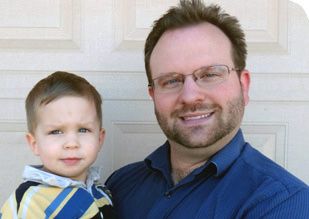
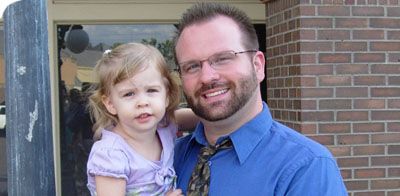
Peoria Computer Repair Service is owned by Matt Karls, an Electrical Engineer and a Computer Systems Engineer. We are a team of computer professionals focused on service and quality, all our work is guaranteed.

If you have any computer, technology or IT problem in Peoria, AZ we can fix it. We have been performing computer repair in Peoria full time since 1999. Feel free to give us a call at (623) 295-2645 or send us a text message at (602) 633-4584.

Peoria Computer Repair Service's Computer Engineer

What is your Service Area for on-site Computer Repair?

We have serviced Peoria and the entire Phoenix metro area for over a decade.

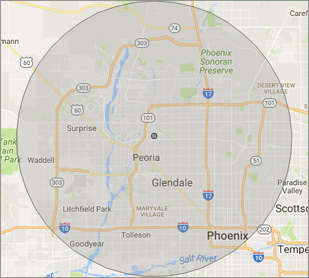
Our primary on-site mobile service area includes Peoria, AZ and most of the West Valley of the Phoenix metropolitan area.

We provide remote and on-site mobile computer repair in Glendale, Peoria, Surprise, Goodyear, El Mirage, Sun City, Sun City West, Litchfield Park, Tolleson, Phoenix, Ahwatukee, Paradise Valley, Scottsdale, Tempe, Chandler, Sun Lakes, Queen Creek, San Tan Valley, Gilbert and Mesa.

Our on-site Computer Service Area

What should someone expect that hires you for Computer Service?

Our mission is to fully resolve your computer problems quickly and affordably. If you want a Computer Engineer that can fix all of your computer problems instead of a computer tech, a computer geek, a technician or a computer guy that can only fix some of your problems; call us at (623) 295-2645.  

What types of Computer Services do you perform?

We service businesses and business clients in their homes, including:
 
  • Diagnose / repair hardware or software problems
  • Spyware, malware, trojan and virus removal
  • Setup wireless and small business networks
  • Laptop repair, PC repair and Apple repair
  • Hard drive data recovery

Peoria Computer Repair Service Contact Information

Peoria Computer Repair Service
7558 W Thunderbird Rd #1-415, Peoria, AZ 85381
(623) 295-2645

Book an Appointment

Peoria Computer Repair Service is a Karls Technology company

* *
*
*
*
  *
* *


*
*
* * * * * * * * * * * * * * *
4.9 / 5 stars from 236 reviews

"Chris did a great job. Was very polite and worked steadily till all the work was fully completed."

Peoria Computer Repair Service 5 / 5 stars

"Tech took time to install a terabit from an older computer and took the unwanted computer away. Should I need assistance in the future, I will contact."

Peoria Computer Repair Service 5 / 5 stars

"The service was prompt and professional and the price was right! Thank you very much!"

Peoria Computer Repair Service 5 / 5 stars

"Can't say enough of what was right. It was a great experience with wonderful support. I felt the service was well priced and that Matt had my best interests in mind with everything he did. Amazing service and I have already begun referring others."

Peoria Computer Repair Service 5 / 5 stars
Best Antivirus Software of 2026: The Ultimate Guide to Cybersecurity Brands

In 2026, the digital threat landscape has shifted. We are no longer just fighting simple viruses; we are defending against AI-generated phishing, sophisticated ransomware-as-a-service, and complex identity theft. Choosing the right antivirus brand is no longer optional—it is the foundation of your digital life. At Karls Technology, we’ve analyzed the top-performing security suites of the […] The post Best Antivirus Software of 2026: The Ultimate Guide to Cybersecurity Brands appeared first on Computer Repair Blog.

New macOS Update Releasing Soon

Apple has confirmed that the public release of macOS Ventura will occur on Monday, October 24. According to 9to5mac, there will be a number of new additions to this newest version of macOS. Using an iPhone in place of a webcam on a computer is now possible thanks to the next version of the operating […] The post New macOS Update Releasing Soon appeared first on Computer Repair Blog.

Apple’s New Automatic Verification Feature

Automatic Verification, introduced in iOS 16, allows users to skip CAPTCHA validation by using iCloud to discreetly authenticate their device and Apple ID. It is no longer necessary to interpret squiggly language or tap on traffic signal graphics to demonstrate whether or not you’re not a bot. According to MacRumors, iOS 16 automatically enables Automatic […] The post Apple’s New Automatic Verification Feature appeared first on Computer Repair Blog.

Windows 11 Remote Desktop Issues

Microsoft is looking into reports of Remote Desktop issues on Windows 11 computers following installation of the Windows 11 2022 Update. According to Bleeping Computer, it is possible that after upgrading to Windows 11 22H2, Remote Desktop clients will either fail to connect, detach unexpectedly, or stop working altogether. Until Microsoft releases official fixes, you […] The post Windows 11 Remote Desktop Issues appeared first on Computer Repair Blog.

Microsoft Fixes Bug on Windows 10

Microsoft has fixed an error that could cause the taskbar and desktop to disappear on Windows 10 computers. The same problem has been attributed by the corporation to the consumers’ gadgets freezing and not responding to input, according to Bleeping Computer. They also share that the affected versions are 20H2, 21H1, 21H2, and 22H2. Make […] The post Microsoft Fixes Bug on Windows 10 appeared first on Computer Repair Blog.

Gaming Issues on Windows 11

Several players have complained that their games have slowed down since installing the latest Windows 11 OS upgrade. Both stuttering and other glitches cause them difficulty. It’s possible that this speed drop is the result of some apps and games mistakenly activating GPU performance debugging tools. Microsoft has yet to fix this issue in the […] The post Gaming Issues on Windows 11 appeared first on Computer Repair Blog.

Check Graphic Cards Temperature

The graphics card is the brains of any good gaming computer. Graph cards are especially prone to irregularity and failure after months without being properly cared for and maintained. Obviously, the best way to maximize the usefulness of your GPU and lengthen its lifespan is to prepare for it in advance. They are responsible for […] The post Check Graphic Cards Temperature appeared first on Computer Repair Blog.

Focus Assist on Windows 11

Focus Assist made its debut in Windows 10 in 2018, and while it was useful before, its capabilities have greatly expanded in Windows 11. Pro and Con of Focus Assist Notifications have the potential to drastically decrease productivity by diverting our attention to something else. Turning off alerts, however, has the potential to backfire in […] The post Focus Assist on Windows 11 appeared first on Computer Repair Blog.

MacOS Ventura Update is Available

Check Software Update in the System Settings App. macOS Ventura makes the things you do most on Mac even better, with powerful new ways to get more done, share and collaborate in your favorite apps, immerse yourself in next‑level games, and take full advantage of your other devices. Source: Apple The MacOS Ventura 13.0 update is now […] The post MacOS Ventura Update is Available appeared first on Computer Repair Blog.

Closing Windows with Shortcut

Pressing the Windows key + D instantly minimizes all open windows. By doing it this manner, you can avoid manually closing each window. To restore any minimized windows to their original position, hit the Win and D keys simultaneously. The desktop can be accessed by hitting the Windows key and the letter M. Apps like […] The post Closing Windows with Shortcut appeared first on Computer Repair Blog.